sidplay2 and modern ALSA (for Maemo)
20 July 2008 10:38:01
maemo, software, update
Good old sidplay2 does
superb job in emulating SID, the sound chip of Commodore 64. However
it's old and its ALSA "driver" is obsolete. Besides that, it
only tries to compile ALSA on QNX. This patch should fix both issues.
This also means that you can finally run sidplay2 on Maemo Chinook and
newer. If you're planning to play SID tunes on NIT, you may want to
use sidplay1 instead to improve playback
time.
When patching, you will have to apply Debian patch before Maemo patch.
Naturally you will also have to recreate configure after
applying the ALSA patch.
automake && autoconf should do the trick.
Note that automake may suggest running aclocal, and doing this will
potentially break configure.
Permalink | Comments (0)
sidplay1 and ALSA (for Maemo)
16 July 2008 17:49:46
maemo, software, update
The original Unix port of sidplay is fast and it has audio driver
support for OSS, HPUX, PC-SND, SGI, and SPARC. Not ALSA. sidplay2 has
better emulation and (kind of) support for ALSA, but compared to
sidplay1 it's horribly slow. Guess which one suits Nokia Internet
Tablets better? However if you prefer quality over playback time,
see the entry about sidplay2.
I wrote an ALSA driver for good old sidplay. The patch merges with
sources fetched from Your Favourite(tm) Debian repository. Patched copy
can then be configured as usually, and if necessary headers and
libraries are found, compiled with support for ALSA. This patch isn't
in any way Maemo/NIT specific, but it has been developed to be used on
NIT.
Two versions of the patch exist, both are generated with sources from
Debian repository. Once applied, configure and
Makefile.in need to be recreated. It should be enough to issue
automake-1.4 && autoconf. You can also
download pre-compiled package for Maemo Chinook/Diablo.
Permalink | Comments (0)
Welcoming the 21st century
6 July 2008 20:07:20
hardware
katei.fi (and virtual hosts
such as wnd.katei.fi) is
now served with the 21st century technology! Cheers!
When I first started using a GNU/Linux box to route my home network
back in early 2001 or so, I relied on shimobe. With
48 MiB of RAM and a CPU clocked at 33 megahertz, it was not
the fastest on the block, but it could run X, FVWM and Opera when
needed. Since shimobe refused to boot from hard drive if two
were attached at the same time, a boot floppy was required. Also, BIOS
always stopped for hard drive error at system start up, requiring user
to press F2 to continue. Naturally this wasn't an issue, unless power
shortages were expected.
shimobe didn't serve for very long. It was replaced by
tomodachi in 2002. With a 133 MHz Pentium as CPU and
whopping 96 MiB of system memory, it was major update. Still,
tomodachi didn't come without surprises. Even though a boot
floppy was no longer needed, BIOS occasionally failed to detech hard
drives, requiring user interaction. Apart from that, the system always
booted up nicely.
In 2004, zenoo moved in. Boasting 384 megabytes of RAM and a
Celeron CPU running at 333 MHz, zenoo was crowned the new
king. Or server. Or old server, actually. Like its predecessors,
zenoo was used when I started using it. It also followed the
tradition that each server had to have its unique quirk. While it
always booted perfectly fine without user intervention, it was picky
about electricity we fed it. Being plugged into wrong socket it refused
to run. No, seriously, it did. I guess our last apartment could've had
better wiring... Eventually magic smoke escaped zenoo's power
supply unit, and we had to get a new one. And couple of years lated
another.
 zenoo ran smoothly until about a month ago. I wanted to
install two new hard drives for RAID-1, so I shut down the system,
installed the disks, put everything back together, and switched on the
PSU. *bzz* The PSU made high-pitch buzzing sound and the
system refused to start up. I quickly cut the power, and started
sniffing. No, the smoke was still sealed in the PSU. I detached the
disks, and the system started up. Excuse me, a 400-watt power supply
that can't feed a Celeron and four disks? I found out the system
would't boot at all with four hard drives. With three, the power supply
would make funny noises. With two, the system would run normally. I
ended up disconnecting the two hard drives, and running the system as I
had done before. Later it turned out the system would now spend one
third of its time in IO-wait. This was the last straw. zenoo
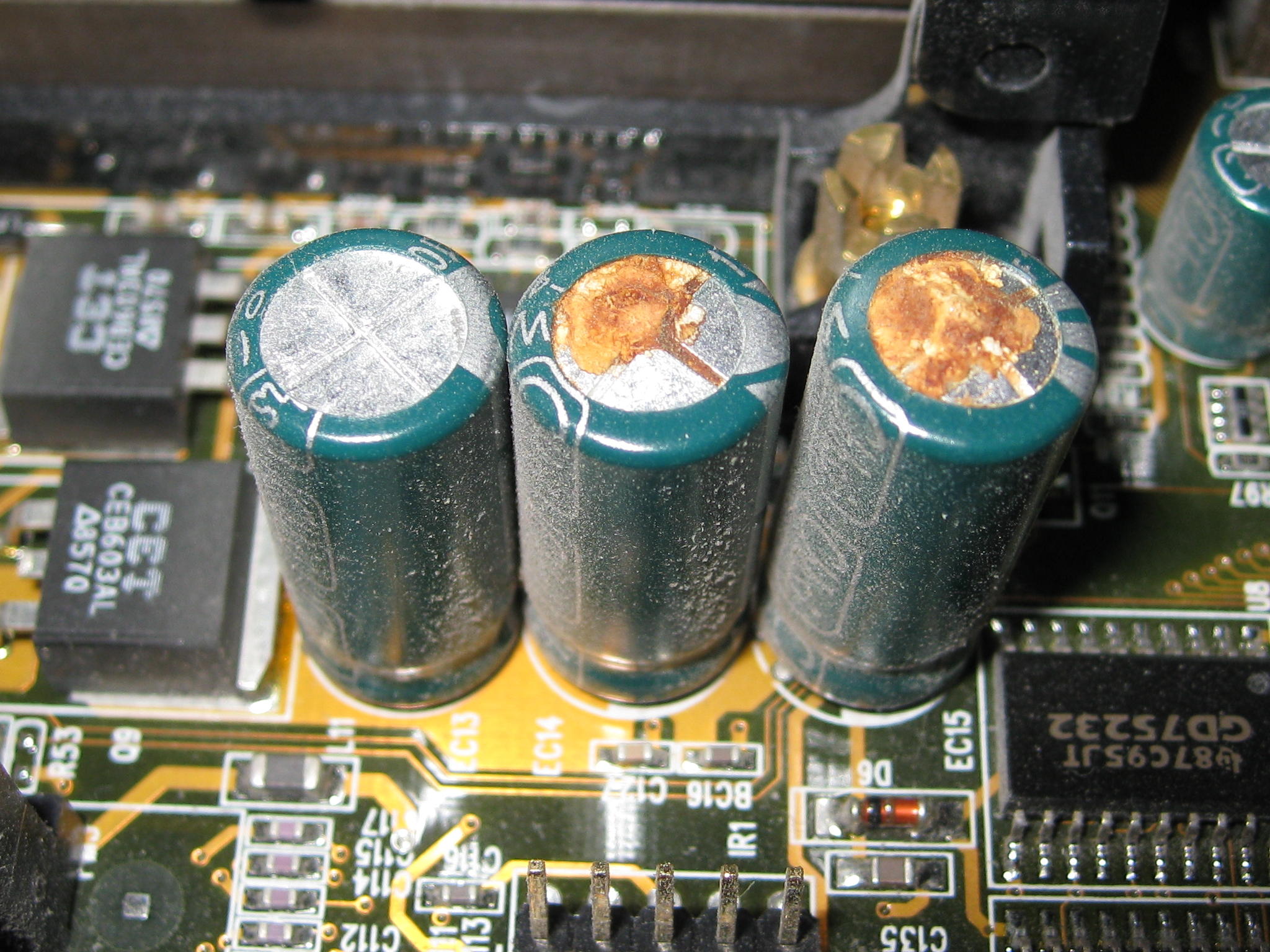
would have to go. Later it turned out that zenoo was suffering
from capacitor plague.
zenoo ran smoothly until about a month ago. I wanted to
install two new hard drives for RAID-1, so I shut down the system,
installed the disks, put everything back together, and switched on the
PSU. *bzz* The PSU made high-pitch buzzing sound and the
system refused to start up. I quickly cut the power, and started
sniffing. No, the smoke was still sealed in the PSU. I detached the
disks, and the system started up. Excuse me, a 400-watt power supply
that can't feed a Celeron and four disks? I found out the system
would't boot at all with four hard drives. With three, the power supply
would make funny noises. With two, the system would run normally. I
ended up disconnecting the two hard drives, and running the system as I
had done before. Later it turned out the system would now spend one
third of its time in IO-wait. This was the last straw. zenoo
would have to go. Later it turned out that zenoo was suffering
from capacitor plague.
After some asking around, I ended up ordering passively-cooled
motherboard and CPU, one gigabyte of RAM and a new PSU. After three
weeks of waiting, everything but the PSU was available. Last Friday I
decided I didn't want to wait for any longer. I replaced the PSU in my
order and took the components home. I spent the next day setting up the
system in a cardboard box, and as the CPU architecture was upgraded to
64-bit, installing things from scratch. I copied most of the old
configuration, and set everything up. Finally I was ready to shut down
zenoo for good, and reuse its case with modern hardware. I had
to stop for a moment to realise zenoo had served me for four
years. It was my longest serving server so far. It was now time for
chikan to take over.
Following old tradition, chikan decided not to boot up. Or in
fact, it decided not to detect its SATA hard drive. Sigh. I tracked
things back to newly installed 3Com network card. After I had replaced
the NIC with another 3Com card and switched on power, the screen
remained blank. That was rather intriguing as I had just recently used
the very same NICs with zenoo without a single issue. I tried
three more 3Com network cards (all five being 3c905-family models) I
happened to have. chikan booted perfectly fine with each one
of them. I ended up favouring one of the 3Com cards over a RTL-8139b
card I also had. This was a bit risky choice, as each one of the three
used to have some sort of issue with the computer it used to be in.
The particular one chose used to be in kikai. One day it
simply stopped transmitting bits after being powered for a few hours.
Still, I decided to give it a try.
chikan is now fully synchronised with zenoo's old
disks, and it's running with some 240 GiB of RAID-1 mirrored disk space
for backups. Everything is blazing fast, and everything is running
smoothly -- for now. I should've done this long time ago. Here's the
final configuration.
Final configuration:
- Intel D201GLY2 motherboard with integrated Celeron 220 CPU
(1.2 GHz), with integrated 100 Mb/s NIC.
All components passively cooled.
- 1 GiB of Corsair DDR2 CL5 memory
- Nexus NX-8040 400 watt PSU
- Seagate Barracuda ES 250 GB hard drive
(system disk)
- Two Seagate Barracuda 7200.10 320 GB hard drives
(RAID-1)
- 3Com 3C905-TX NIC
Permalink | Comments (0)